先去咱们glb官方下载glb/gltf格式模型 glbxz.com 开始下面设置教程动画
如 Simple Animation 示例所示,动画可用于描述节点的 、 或 属性如何随时间变化。translationrotationscale
以下是 .这一次,动画包含两个通道。一个用于动画平移,另一个用于动画化节点的旋转:animation
"animations": [ { "samplers" : [ { "input" : 2, "interpolation" : "LINEAR", "output" : 3 }, { "input" : 2, "interpolation" : "LINEAR", "output" : 4 } ], "channels" : [ { "sampler" : 0, "target" : { "node" : 0, "path" : "rotation" } }, { "sampler" : 1, "target" : { "node" : 0, "path" : "translation" } } ] } ],
动画采样器
该数组包含 animation.sampler 对象,这些对象定义必须在关键帧之间插入访问器提供的值,如图 7a 所示。samplers
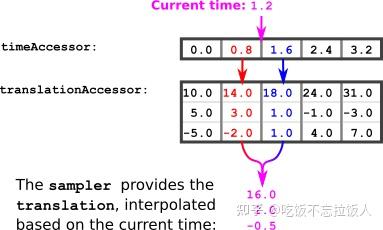
图 7a:动画采样器。
为了计算当前动画时间的平移值,可以使用以下算法:
- 设当前动画时间为 。
currentTime - 计算 times 访问器的下一个 smaller 和 next larger 元素:
previousTime= times 访问器中小于currentTimenextTime= times 访问器中大于currentTime - 从 translations 访问器中获取与这些时间相对应的元素:
previousTranslation= 来自 translations 访问器的元素,对应于previousTimenextTranslation= 来自 translations 访问器的元素,对应于nextTime - 计算插值。这是一个介于 0.0 和 1.0 之间的值,用于描述 、 和 之间的相对位置 :
currentTimepreviousTimenextTimeinterpolationValue = (currentTime - previousTime) / (nextTime - previousTime) - 使用插值计算当前时间的平移:
currentTranslation = previousTranslation + interpolationValue * (nextTranslation - previousTranslation)
例:
想象一下 1.2。times 访问器中的下一个较小元素是 0.8。下一个较大的元素是 1.6。所以currentTime
previousTime = 0.8 nextTime = 1.6
可以查找 translations 访问器中的相应值:
previousTranslation = (14.0, 3.0, -2.0) nextTranslation = (18.0, 1.0, 1.0)
插值可以计算:
interpolationValue = (currentTime - previousTime) / (nextTime - previousTime) = (1.2 - 0.8) / (1.6 - 0.8) = 0.4 / 0.8 = 0.5
根据插值,可以计算当前转换:
currentTranslation = previousTranslation + interpolationValue * (nextTranslation - previousTranslation) = (14.0, 3.0, -2.0) + 0.5 * ( (18.0, 1.0, 1.0) - (14.0, 3.0, -2.0) ) = (14.0, 3.0, -2.0) + 0.5 * (4.0, -2.0, 3.0) = (16.0, 2.0, -0.5)
所以当当前时间为 1.2 时,节点的 为 (16.0, 2.0, -0.5)。translation
动画通道
动画包含一个 animation.channel 对象数组。通道在输入(即从采样器计算的值)和输出(动画节点属性)之间建立连接。因此,每个通道使用采样器的索引引用一个采样器,并包含一个 animation.channel.target。该 使用节点的索引引用节点,并包含一个 定义应进行动画处理的节点的属性。采样器中的值将写入此属性。targetpath
在上面的示例中,动画有两个通道。两者都引用同一个节点。第一个通道的 path 是指节点的 ,第二个通道的 path 是指节点的 。因此,附加到节点的所有对象(网格)都将由动画平移和旋转,如图 7b 所示。translationrotation
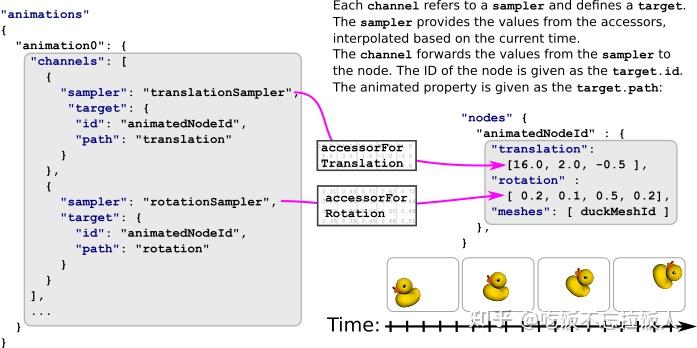
图 7b:动画通道。
插值
上面的示例仅涵盖插值。glTF 资产中的动画可以使用三种插值模式:LINEAR
STEPLINEARCUBICSPLINE
步
插值并不是真正的插值模式,它使对象在关键帧之间跳转,而无需任何类型的插值。当采样器定义步进插值时,只需应用对应于 的关键帧的转换。STEPpreviousTime
线性
线性插值与上述示例完全对应。一般情况是:
计算 :interpolationValue
interpolationValue = (currentTime - previousTime) / (nextTime - previousTime)
对于标量和向量类型,请使用线性插值(通常在数学库中称为)。下面是一个 “伪代码” 实现供参考lerp
Point lerp(previousPoint, nextPoint, interpolationValue) return previousPoint + interpolationValue * (nextPoint - previousPoint)
如果旋转表示为四元数,则需要在上一个值和下一个值之间执行球形线性插值 ():slerp
Quat slerp(previousQuat, nextQuat, interpolationValue) var dotProduct = dot(previousQuat, nextQuat) //make sure we take the shortest path in case dot Product is negative if(dotProduct < 0.0) nextQuat = -nextQuat dotProduct = -dotProduct //if the two quaternions are too close to each other, just linear interpolate between the 4D vector if(dotProduct > 0.9995) return normalize(previousQuat + interpolationValue(nextQuat - previousQuat)) //perform the spherical linear interpolation var theta_0 = acos(dotProduct) var theta = interpolationValue * theta_0 var sin_theta = sin(theta) var sin_theta_0 = sin(theta_0) var scalePreviousQuat = cos(theta) - dotproduct * sin_theta / sin_theta_0 var scaleNextQuat = sin_theta / sin_theta_0 return scalePreviousQuat * previousQuat + scaleNextQuat * nextQuat
此示例实现的灵感来自这篇 Wikipedia 文章
三次样条插值
三次样条插值需要的数据不仅仅是上一个和下一个关键帧的时间和值,它还需要每个关键帧的几个切线向量,用于平滑关键帧点周围的曲线。
这些切线存储在动画通道中。对于动画采样器描述的每个关键帧,动画通道包含 3 个元素 :
- 关键帧的输入切线
- 关键帧值
- 输出切线
输入和输出切线是归一化向量,需要按关键帧的持续时间进行缩放,我们称之为 deltaTime
deltaTime = nextTime - previousTime
要计算 的值,您需要从 animation 通道获取 :currentTime
- 关键帧的输出切线方向
previousTime - keyframe 的值
previousTime - keyframe 的值
nextTime - 关键帧的输入切线方向
nextTime
注意:第一个关键帧的 Input Tangent 和最后一个关键帧的 Output Tangent 将被完全忽略
要计算关键帧的实际切线,您需要将从通道获得的方向向量乘以deltaTime
previousTangent = deltaTime * previousOutputTangent nextTangent = deltaTime * nextInputTangent
数学函数在 glTF 2.0 规范的附录 C 中进行了描述。
下面是相应的伪代码片段:
Point cubicSpline(previousPoint, previousTangent, nextPoint, nextTangent, interpolationValue) t = interpolationValue t2 = t * t t3 = t2 * t return (2 * t3 - 3 * t2 + 1) * previousPoint + (t3 - 2 * t2 + t) * previousTangent + (-2 * t3 + 3 * t2) * nextPoint + (t3 - t2)